
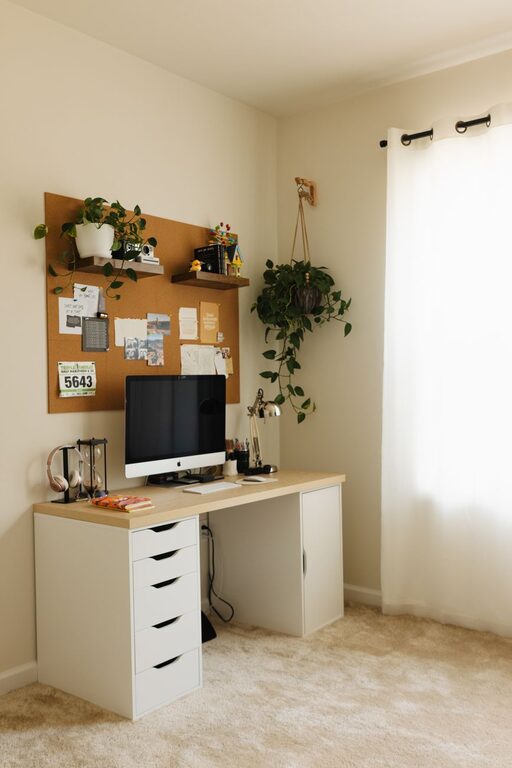
Setting up a productive home office environment is essential for anyone working remotely or managing tasks from home. A well-designed workspace helps you focus, reduces distractions, and enhances your overall work experience. Whether you’re new to working from home or looking to improve your current setup, these practical tips can help you create an office space that supports your productivity and well-being.
Choose the Right Location
Find a Quiet Space
Select a spot in your home where you can work without frequent interruptions. A separate room is ideal, but if that’s not possible, try a quiet corner away from noise and high-traffic areas.
Consider Natural Light
Position your desk near a window to take advantage of natural light. This not only helps with your mood but also reduces eye strain. If natural light is limited, use a good-quality desk lamp with adjustable brightness.
Invest in Ergonomic Furniture
Comfortable Chair
Choose a chair that supports your lower back and allows your feet to rest flat on the floor. Proper seating reduces fatigue and prevents discomfort during long work hours.
Adjustable Desk
An adjustable desk lets you customize the height to suit your needs. Some people prefer standing desks or sit-stand setups, which can improve circulation and reduce stiffness.
Organize Your Workspace
Declutter Regularly
Keep your desk clear of unnecessary items. Use organizers, trays, and drawers to store supplies and documents neatly.
Use Cable Management
Tidy up cables and cords using clips, sleeves, or ties to prevent tangling and maintain a clean look.
Keep Essentials Within Reach
Arrange frequently used items like pens, notebooks, or your planner near your desk area to avoid distractions.
Optimize Technology and Equipment
Reliable Internet Connection
Ensure your internet connection is fast and stable to avoid interruptions during video calls or online work.
Quality Equipment
Invest in a good-quality monitor, keyboard, and mouse. Proper equipment improves efficiency and minimizes strain.
Backup Solutions
Regularly back up important files on external drives or cloud services to prevent data loss.
Create a Routine and Minimize Distractions
Set Clear Work Hours
Establish regular working hours and communicate them with family or housemates to create boundaries.
Use Time Management Techniques
Methods like the Pomodoro Technique, which involves working in focused intervals with breaks, can help maintain concentration.
Limit Interruptions
Turn off non-work-related notifications on your devices and consider using noise-canceling headphones if you’re in a noisy environment.
Personalize Your Space
Add Some Greenery
Plants can improve air quality and add a touch of nature, making your workspace more inviting.
Include Personal Touches
Decorate with artwork, photos, or items that inspire you, but avoid clutter to maintain focus.
Prioritize Comfort and Health
Take Regular Breaks
Standing up, stretching, or walking around every hour can reduce physical strain and refresh your mind.
Maintain Good Posture
Pay attention to your posture while sitting to prevent back and neck pain. Adjust your chair, monitor, and keyboard to promote alignment.
Stay Hydrated and Nourished
Keep a water bottle nearby and eat balanced snacks to sustain energy levels throughout the day.
—
Creating a productive home office doesn’t require a complete overhaul of your space. By incorporating these straightforward tips, you can design an environment that boosts your efficiency, comfort, and satisfaction while working from home. Remember, the key is to tailor your workspace to your unique needs and habits, making it an enjoyable place where you can do your best work.